Stitching out a design that actually looks like the artwork you started with is the hard part of embroidery. Anyone who has watched a machine chew through a poorly digitized file, puckering fabric or leaving gaps where satin stitches should sit, knows the software behind the design matters as much as the machine running it.
Embroidery Legacy Digitizing Software is built for that exact problem. It’s a digitizing program aimed at people who want real control over how a design stitches out, not just a button that auto-converts a picture into a file and hopes for the best. The company traces its roots to 1958 and its current pitch centers on pairing professional-grade digitizing tools with instruction on the embroidery theory that makes a design actually work on fabric.
What Is Embroidery Legacy Digitizing Software?
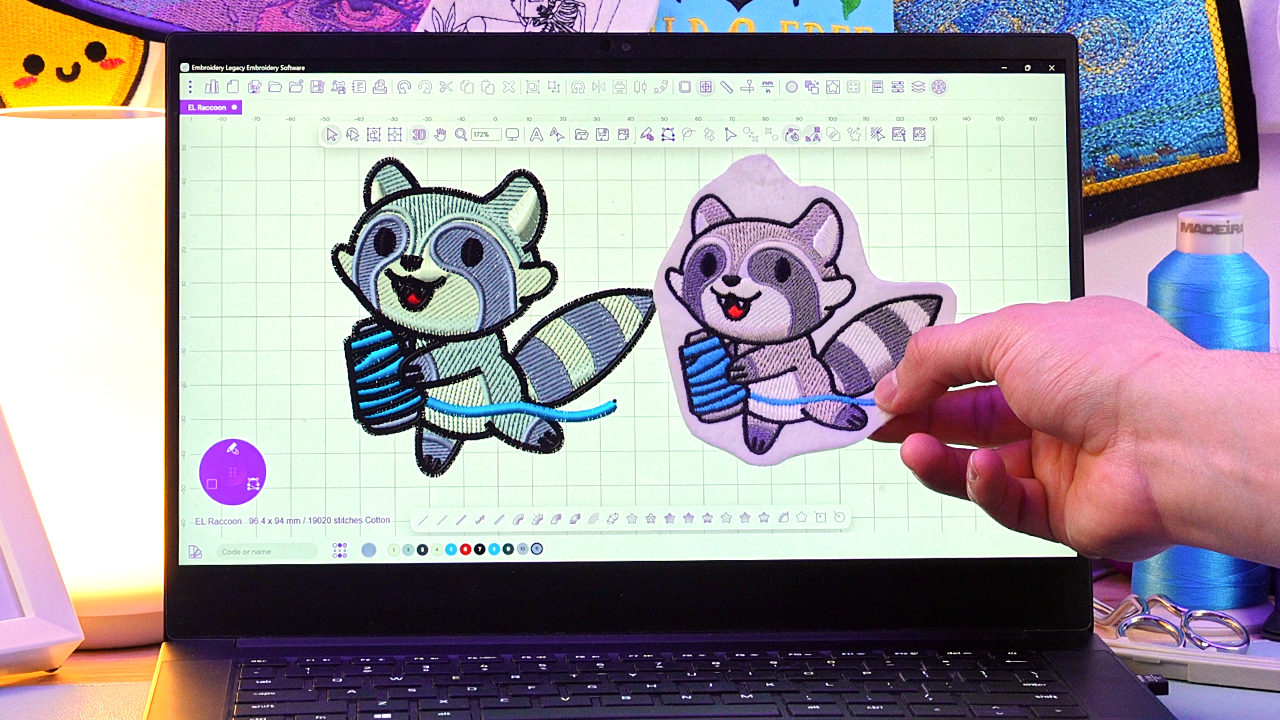
At its core, this is a digitizing program for converting artwork into embroidery machine files, stitch by stitch. Users get manual digitizing and editing tools that let them set stitch types, sequencing and placement by hand, which is the traditional way professional digitizers have always worked.
Layered on top of that manual control are artwork-based tools built for drawing and tracing shapes directly, then assigning stitch properties without leaving that workspace. That combination, full manual control alongside simplified artwork-based creation, is what separates this from software that forces a choice between depth and ease of use. The company describes its output as award-winning embroidery and the tool itself is pitched as a meaningful step up from older, clunkier digitizing programs many hobbyists have used for years.
How the Workflow Actually Runs
A typical project starts with importing artwork, either a scanned sketch, an SVG file, or an FCM cut file and ends with a stitch file ready for a home or commercial machine. The steps generally look like this:
- Import or draw the artwork inside the program.
- Trace or assign shapes using the artwork tools.
- Set stitch types, direction and density for each element.
- Preview the stitch-out and adjust sequencing or compensation.
- Export to a format compatible with the target machine.
The Digitizing Widget keeps the tools used most often, stitch type, direction and density controls among them, within reach on screen, so a project doesn’t turn into a hunt through nested menus. All-In-One Artwork Mode extends that same idea to the drawing stage, letting a user trace a shape and immediately assign a stitch type without swapping between separate tools. For anyone who has used older digitizing software, that alone changes the rhythm of a project from stop-and-search to a more continuous flow.
The Feature Set Worth Knowing
Beyond the workflow tools, the software includes over 200 embroidery fonts, advanced stitch controls for underlay, density and pull compensation and support for SVG and FCM artwork conversion. It’s built to export files compatible with all major embroidery machine brands, which matters for anyone running a mixed setup or upgrading machines down the line.
Applique tools are included for anyone building layered fabric designs and the program also supports computerized quilting machine compatibility, a detail that widens its use beyond straight embroidery into quilting work. A free demo comes bundled with beginner digitizing training, giving new users a way to test the interface and get oriented before committing to the full program.
The Education Piece Sets It Apart
Plenty of digitizing programs teach you which menu to click. Fewer teach you why a design fails on fabric in the first place. Training here comes from John Deer, whose instruction covers the actual embroidery theory behind a design, stitch direction, underlay, density, sequencing, compensation and how different fabrics behave under the needle, rather than just software mechanics.
That distinction matters more than it sounds. A digitizer who understands why a satin stitch puckers on knit fabric but not on woven cotton can fix a problem before it happens. One who only knows which button converts a shape into stitches has to learn that the hard way, through trial, error and wasted thread. The craft of hand embroidery and machine digitizing has always rested on understanding stitch mechanics and this software treats that as part of the product, not an afterthought.
Strengths
Professional depth without the clutter. Manual digitizing and editing tools give experienced users the control they expect, while the interface avoids the crowded, tab-heavy layouts common in older digitizing suites.
Artwork-first creation. Drawing and tracing shapes directly, then assigning stitches on the spot, cuts out a lot of the back-and-forth that traditional workflows require.
Machine compatibility. Support for all major embroidery machine brands means the software isn’t locked to one hardware ecosystem, which matters for anyone upgrading equipment later.
Genuine embroidery education. Training built around stitch theory rather than button-pushing gives hobbyists and small business owners a real path to understanding why a design succeeds or fails, not just how to operate the program.
Where It Falls Short
The learning curve is real for anyone brand new to digitizing concepts. Manual digitizing control is a strength for experienced users, but it means someone who wants a fully automated, hands-off conversion tool will find themselves learning stitch direction and underlay concepts rather than skipping past them.
Quilting compatibility is included but the software’s design center of gravity is embroidery. A shop running quilting as its primary business, rather than as a secondary output, may find the quilting features feel like an add-on rather than a dedicated quilting suite.
Who Should Actually Use This
This fits hobbyists who’ve outgrown pre-made design packs and want to create original work and it fits small embroidery businesses that need custom client designs without hiring outside digitizing help. That creative mindset also extends to projects like decorating shoes with googly eyes, where ordinary items become a chance to make something completely your own. It’s also a reasonable pick for someone who is entirely new to digitizing but wants to learn it properly, since the free demo and beginner training give a real on-ramp rather than dropping a new user into a blank canvas.
It’s a weaker fit for someone who wants a single-click, fully automated conversion tool with no interest in learning stitch theory, or for a large production shop whose entire volume runs through outsourced digitizing services rather than in-house design work.
The Verdict
Embroidery Legacy earns its place by refusing to pick between depth and usability. The manual tools are there for anyone who wants full control over a stitch file, the artwork-based tools cut down the friction of getting from sketch to design and the education from John Deer means users come away actually understanding embroidery rather than memorizing a menu layout.
Hobbyists building a personal design library and small businesses producing custom client work are the clearest fit. Anyone weighing whether to learn digitizing at all should start with the free demo and beginner training bundled with the software, since it’s a low-commitment way to see whether the workflow suits how they actually want to work.